Product Page
The product template displays individual product details including media gallery, variant selection, pricing, and add-to-cart functionality.
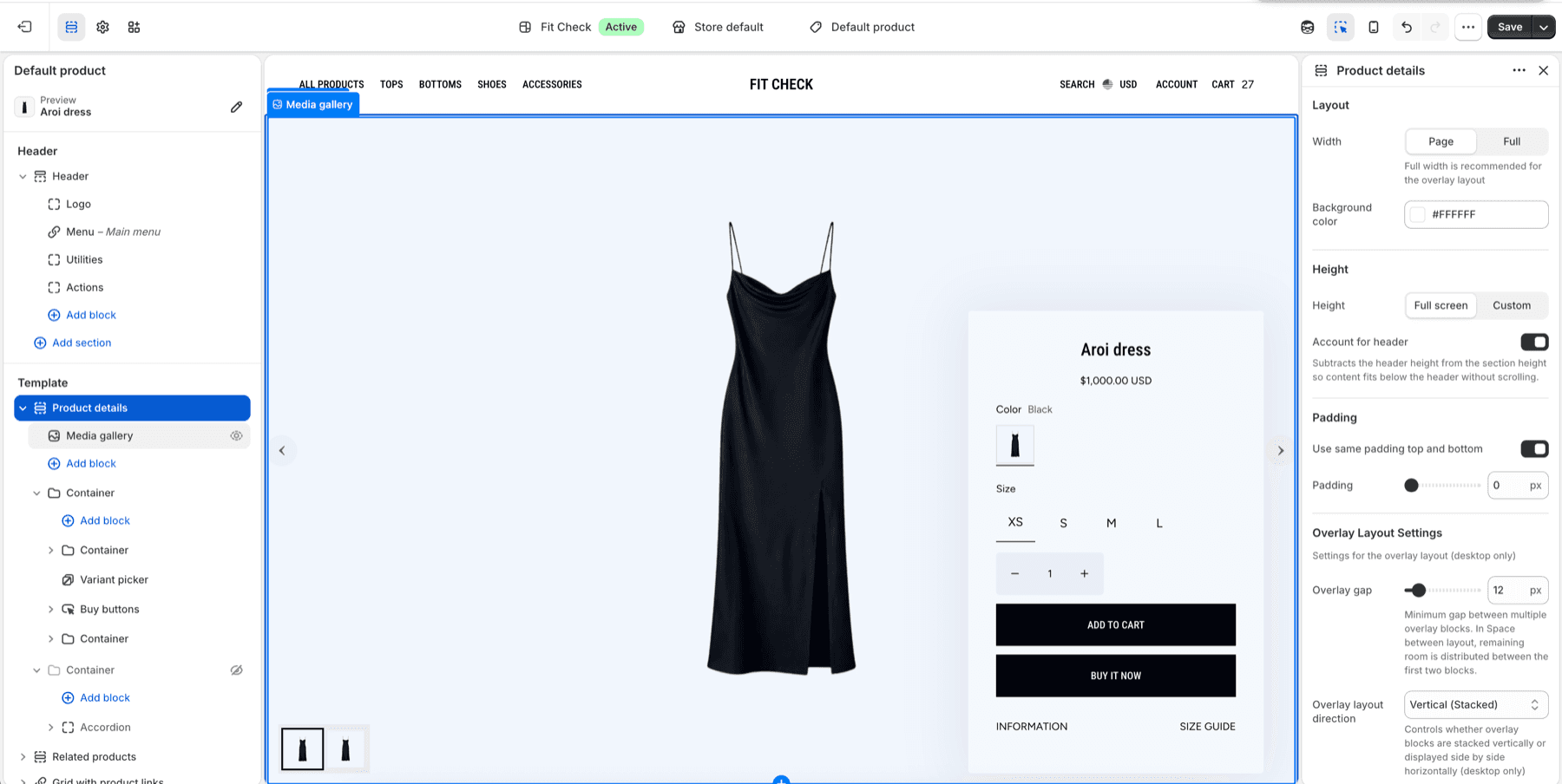
Setup Order
- Open the product templateIn the theme editor top bar, switch to Products and select the default product template or a custom product template.
- Review product detailsConfigure media layout, overlay containers, title, price, variant picker, quantity, selling plan picker, and buy buttons.
- Configure sizingAdd sizing fit where needed, then use the Size guide table block with a product Size Chart metaobject for product-specific measurements.
- Check recommendationsReview the default Recommended products section and add Complementary products only when that optional cross-sell surface is needed.
- Test purchase flowSelect variants, adjust quantity, add to cart, open cart drawer or cart page, and check accelerated checkout buttons.
Editor Steps
- In the theme editor top bar, open Products and choose the product template you want to edit.
- Select a real product in preview so media, variants, price, selling plans, pickup, and app blocks can render populated states.
- Configure the Product details section first because it owns the primary purchase flow.
- Review product form blocks in order: title, price, variant picker, quantity, selling plans, size guide, buy buttons, pickup, description, and app blocks.
- Add or configure recommendation sections after the main product form.
- Preview desktop and mobile before assigning the template to additional products.
Default Layout
The product page includes:
- Product details — Full-bleed media gallery with product information overlay
- Recommended products — Shopify-powered related-product carousel when recommendation data is available
- Grid with product links — Shoppable lookbook-style image grid at the bottom
Editorial Product Template
Use Products → editorial for the dedicated Editorial layout. Its Product details section includes a fixed Media block and a focused product-information column. On mobile, product details and purchase controls follow the media in reading order. For a long details column, choose Product details → Details → Vertical alignment → Top. Center remains the default. Use existing Accordion blocks for long secondary information and separate sections for recommendations, large specification tables, or full review widgets.
To add review stars, select Add block → Apps inside Product details, choose the installed app’s rating block, and move it below Product title. Availability and settings depend on the app. Keep full review widgets below the main product details when they need more width. For subscription apps, follow the Buy buttons setup.
Product Details Section
Media Gallery
The media gallery displays product images, videos, and 3D models. Select the Media gallery block inside Product details to configure its desktop columns, aspect ratio, and Cover/Fit behavior.
Selected Thumbnail Outline
In versions that include this control, both standard and Editorial Product media galleries offer Selected thumbnail outline. For the standard gallery, choose Pagination > Thumbnails to reveal the setting. In Editorial, open the Media block inside Product details.
Choose Theme default, Thin — 1px, Medium — 2px, or Thick — 3px. Theme default preserves the existing selection line, including on galleries saved before this control was added. Each gallery can use its own choice. The setting affects selected gallery thumbnails only; keyboard focus indicators, variant swatches, dots, and counters retain their existing styling.
Aspect Ratio and Fit
| Settings | Result |
|---|---|
| Aspect ratio: Auto + Image position: Cover | The gap-free desktop mode. With 1, 2, or 3 columns, equal-width slots use the complete available section height and each source is cropped within its slot. |
| Portrait + Cover | The shipped default for new/default product galleries. The portrait frame is made as large as possible and centered within each equal-width column and the available section height; the source is cropped inside the frame. |
| Square or Landscape + Cover | Preserves the selected frame shape. The frame is made as large as possible and centered within each equal-width column and the available section height; the source is cropped inside the frame. |
| Portrait, Square, or Landscape + Fit | Preserves the same maximized, centered frame, but keeps the complete source visible without cropping. |
| Auto + Fit | Preserves each uploaded image’s natural aspect ratio without cropping. |
With a fixed ratio, especially Square or Landscape in a 2- or 3-column desktop gallery, space can intentionally appear above and below the centered frame when the Product details section height does not match the frame geometry. To reduce or remove that space, open Product details > Section height, choose Custom, and adjust Custom height until the section better matches the frame.
On mobile, the gallery is a one-column swipe carousel, so the desktop column count does not apply. Mobile aspect ratio defaults to Same as desktop, preserving existing gallery layouts. In versions with this setting, choose Auto, Portrait, Square, or Landscape in the standard Media gallery to override the frame on screens narrower than 750px. Auto uses each image’s natural ratio. Mobile image fit independently selects Cover or Fit below 750px; Same as desktop preserves the existing fit. To keep desktop Fit while filling a square mobile frame, choose Mobile aspect ratio: Square and Mobile image fit: Cover. Cover crops the image; the existing Crop anchor controls which area stays visible. Fit shows the whole image and may add space rather than enlarge the product. Desktop and the full-screen zoom viewer keep their existing sizing. If Mobile pagination is Hint, a small part of the next slide remains visible without changing the selected Cover/Fit behavior.
The gallery also supports:
- Multiple images with thumbnail navigation
- Shopify-hosted videos
- 3D model viewer
- Thumbnail navigation controls
- Variant-aware media updates
- Desktop full-screen or custom-height presentation
Variant Picker
Customers can select product options using:
- Color swatches — Visual color/pattern selectors
- Size buttons — Clickable size options
- Dropdown menus — For options with many values
Unavailable variants display a sold-out indicator based on the global Swatches > Sold out indicator setting (Dimmed & strikethrough or X slash).
Variant controls are rendered as one coordinated picker per product form, so selected option state, price, pickup availability, selling plans, and product media update together.
1.8.0 corrects rapid variant changes so the latest selected variant is preserved in product links and after reload. On a draft, change options quickly, follow the product link where available, and reload to confirm the expected variant remains selected. Also review price, stock and pickup information for that variant. See Latest updates for availability and pickup compatibility guidance if your store has custom pickup CSS.
Use the Variant Pickers and Swatches guide when you need to configure product data, global Variant pickers, global Swatches, product-card swatches, and Product page picker behavior together. Use the Variant picker block reference when you need the exact Product form block settings.
Overlay Layout
The Product details section supports a media-first overlay layout on desktop.
| Setting | Description |
|---|---|
| Section height | Full-screen or custom height. |
| Account for header | Subtracts header height when calculating the section height. |
| Overlay layout direction | Stack overlay containers vertically or display them side by side on desktop. |
| Overlay gap | Controls the minimum gap between multiple overlay blocks. |
| Overlay position | Place overlay content left, center, right, top, center, bottom, or spaced between. |
| Overlay blur | Adds backdrop blur behind overlay container blocks. |
| Uniform overlay size | Forces overlay containers to use the same width and optional fixed height. |
| Overlay offsets | Controls distance from top or bottom edges on desktop. |
Use the Product details section to position overlay panels, then use Container blocks to build the panels themselves. For examples of split information/purchase panels, centered purchase cards, and side purchase cards, see Product details containers.
Product Details Containers
Product details containers are normal Container blocks inside the Product details section. They are useful when the product page needs an information panel, a purchase panel, or a compact card over the product media.
| Pattern | Use |
|---|---|
| Split overlay containers | Put disclosures, shipping, manufacturing, or fit content in one panel and buying controls in another. |
| Centered purchase container | Keep title, price, variants, and add-to-cart in a compact card over the media gallery. |
| Side purchase container | Keep the product form near the media while large product images stay dominant. |
Avoid whole-container links in Product details because variant pickers, buy buttons, disclosure rows, and app blocks are already interactive.
Selling Plan Picker
If your products have subscription plans (via a subscriptions app), a radio-based plan picker appears with:
- One-time purchase option (always first, selected by default)
- Subscription plan options with per-delivery pricing
- Discount badges showing percentage savings
- Variant-aware pricing that updates when the customer switches variants
Use the Product and Cart templates together to test one-time purchase, subscription purchase, cart line item display, and variant changes.
Buy Buttons
| Block | Description |
|---|---|
| Add to cart | Standard add-to-cart button. |
| Accelerated checkout | Shop Pay, Apple Pay, Google Pay buttons. |
| Buy it now | Goes directly to checkout, skipping the cart. |
When the global cart type is set to Drawer, add-to-cart can automatically open the cart drawer after a successful add.
Use Buy buttons block for the purchase stack, Quantity block for quantity rules, and Stock status block for inventory feedback.
Additional Blocks
| Block | Description |
|---|---|
| Price | Product price with sale, compare-at, and unit pricing. |
| Quantity selector | Adjust quantity before adding to cart. |
| Sizing fit indicator | Optional fit meter driven by the product’s custom.sizing_fit_score metafield. |
| Size guide table | Measurement table with manual fallback or product-specific Size Chart metaobject source, including inches and centimeters toggle. |
| Product description | Full product description text. |
| SKU | Display the product SKU. |
| Inventory status | Show stock levels or availability. |
| Pickup availability | Local pickup information. |
| Share buttons | Social sharing links. |
Use Product information blocks for title, price, description, and SKU setup, Product disclosures block for structured disclosure rows, and Sizing fit block for the five-step fit indicator.
Size guide block
The default product template includes a Size guide drawer with a sizing-fit indicator and a size-guide table.
For product-specific charts, create a Shopify Size Chart metaobject, connect it to products through the custom.size_chart product metafield, then set the Size guide table block to Product size chart metaobject in the theme editor.
Use Size guide setup guide for the screenshot-led setup process, including the metaobject fields, product metafield, product assignment, theme editor setting, and automatic inches/centimeters conversion. Use Size guide block for the block reference.
Create separate Product templates only when the layout itself needs to change. Different garment categories can usually share one Product template and use different Size Chart entries.
Quick Add
Product cards and recommendation carousels can expose quick-add controls when their Product item blocks and parent surfaces enable quick add. Products with multiple options open the quick-add modal so customers can choose variants before adding to cart.
Review product-card blocks, Search, recommendations, and Cart references when quick add is enabled on collection grids, search results, recommendations, or cart upsells. Use the Shopify Search & Discovery guide when you need to choose the related or complementary products behind product-page recommendation sections.
Purchase Flow Checklist
| Flow | What to test |
|---|---|
| Variant selection | Select each product option and confirm media, price, availability, and URL state update correctly. |
| Quantity | Increase and decrease quantity before add-to-cart. |
| Add to cart | Add the selected variant and confirm cart drawer/page behavior matches Theme settings > Cart. |
| Accelerated checkout | Confirm accelerated buttons remain visible and do not compete with the primary add-to-cart action. |
| Selling plans | Test one-time and subscription options when a product has selling plans. |
| Pickup availability | Confirm pickup content updates when variants change. |
| App blocks | Confirm review, subscription, loyalty, sizing, or other app content loads without crowding purchase controls. |
Product Data Checklist
| Product data | Why it matters |
|---|---|
| Images and media | Drives gallery, variant media, cards, recommendations, and social previews. |
| Options and variants | Drives variant picker, swatches, price, availability, and quick add. |
| Compare-at price | Drives sale price display and badges. |
| Metafields | Drives size guides through custom.size_chart, fit details, care notes, campaign copy, and app data where used. |
| Collections and tags | Help with collection placement, filters, custom badges, and recommendation context. |
| Subscription plans | Drives selling plan picker and subscription cart line data. |
Structured Data
The product page automatically outputs Product JSON-LD structured data for search engines, including price, availability, and review information.
Related References
- Guides
- Product details containers
- Variant Pickers and Swatches guide
- Global settings
- Variant picker block
- Buy buttons block
- Product information blocks
- Product disclosures block
- Stock status block
- Sizing fit block
- Size guide block
- Product recommendations
- Shopify Search & Discovery guide
- Featured product
- Product links
- Cart template