Header
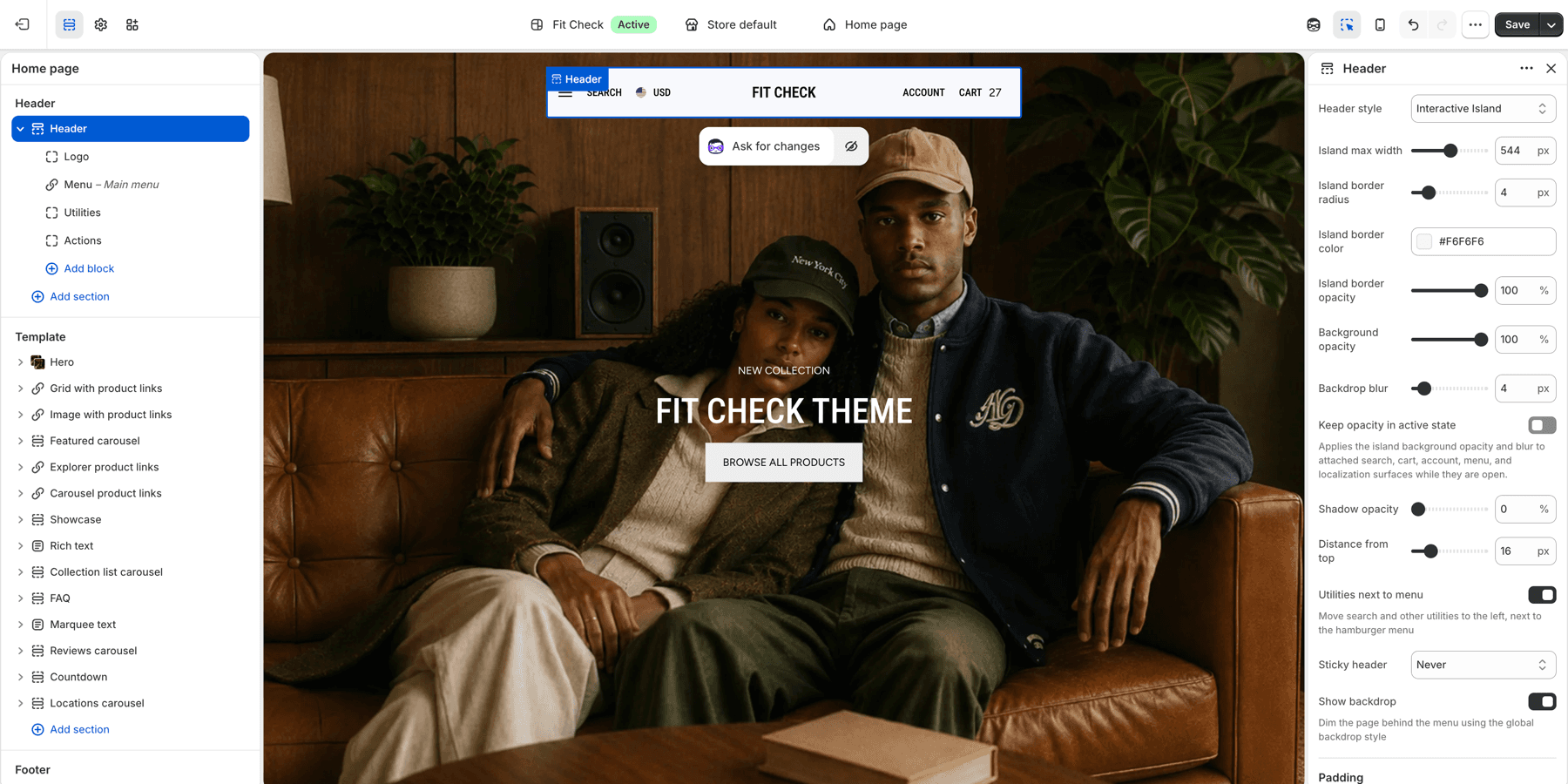
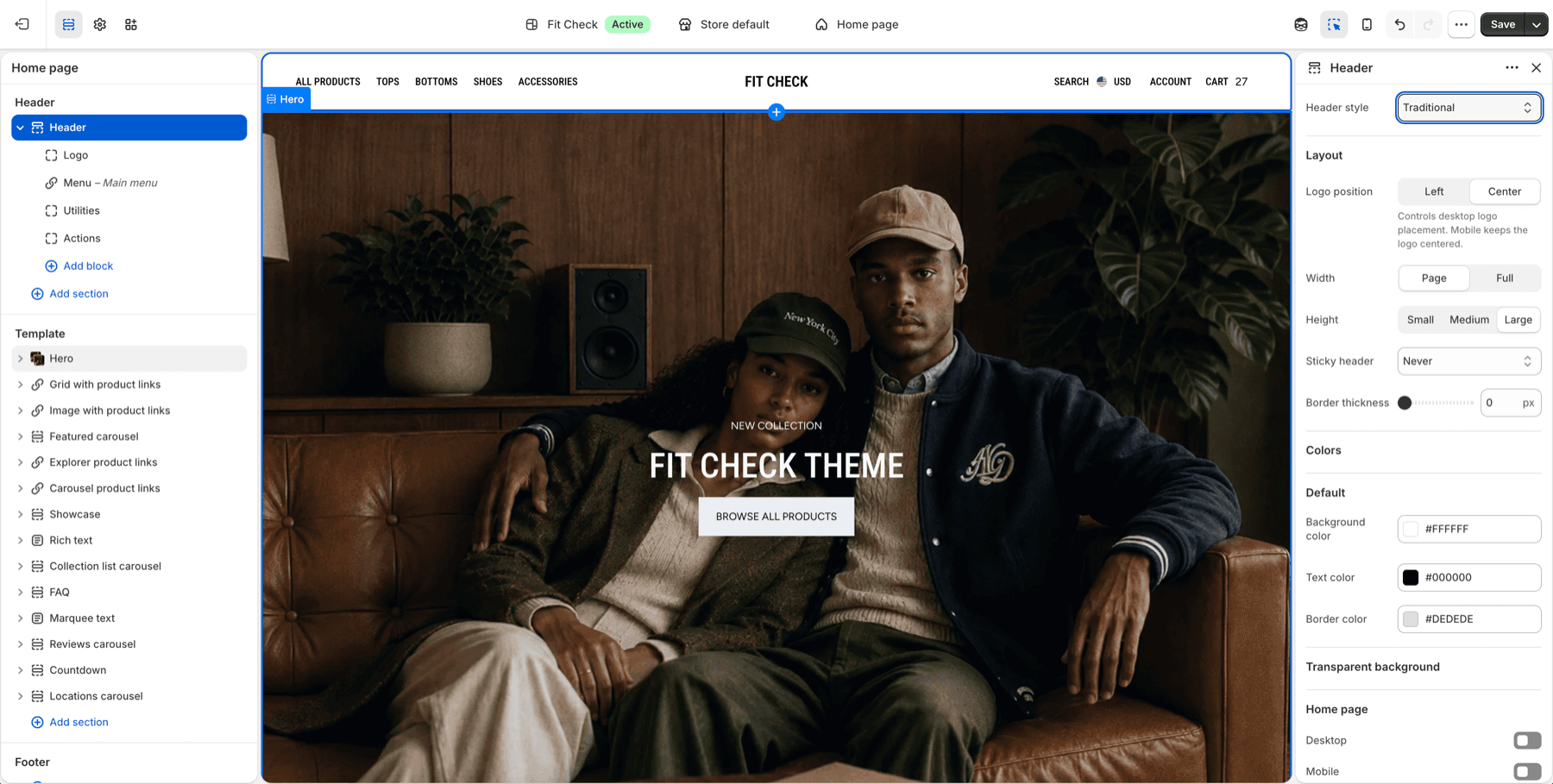
The site header provides navigation, search, account access, and cart functionality. Fit Check offers two header styles: a modern floating bar (interactive island) and a classic traditional layout.
Configure the Section
The header is a global section that appears on all pages. To customize it:
- In the theme editor, click the Header section in the left sidebar.
- Choose the header styleUse Interactive island for the floating bar header or Traditional for a classic full-width header.
- Assign navigationUse Shopify navigation menus for primary links and nested menus.
- Review utilitiesConfirm search, cart, account, country, and language controls appear where customers expect them.
- Add announcement if neededUse Island announcement for short messages below the floating header.
Step-by-Step Setup
- In the theme editor, open the Header section from the left sidebar.
- Choose Header style: Interactive island for the floating bar header or Traditional for a full-width header.
- Assign the main menu from Shopify navigation.
- Upload the default and inverse logo in Theme settings > Global Settings.
- Review search, cart, account, country, and language controls.
- If using Interactive island mode, add Island announcement only when a short global message is needed.
- Preview the home page, product page, search page, cart, and a collection page before publishing.
Ordinary announcements with floating or transparent headers
1.8.0 keeps Announcement slider and Announcement marquee usable with floating and transparent headers, including a header group that also contains an Island announcement. When an ordinary announcement follows the header, the layout reserves space for it and the header uses its configured regular colors instead of transparent-overlay colors. An Island-only composition keeps its floating behavior. See Latest updates for release details.
Preview the actual section order on desktop and mobile, both at the top of the page and after scrolling. Confirm the message, links, slider controls and header utilities remain visible and clickable. Review regular header colors as well as transparent colors when adding an ordinary announcement.
Header Workflow Checks
| Workflow | What to test |
|---|---|
| Navigation | Open top-level and nested menu links on desktop and mobile. |
| Search | Trigger search from the header and confirm drawer/page behavior matches Theme settings > Search. |
| Cart | Add an item to cart, then open the cart icon from the header. |
| Account | Confirm account links are visible only where expected for the store setup. |
| Localization | Open country/language selectors and confirm the panel or drawer remains readable. |
| Transparent states | Review home page contrast when transparent header settings are enabled. |
Section Settings
General
| Setting | Description |
|---|---|
| Header style | Choose Interactive island (floating bar) or Traditional (classic full-width). Default: Interactive island. |
Traditional Mode Settings
| Setting | Description |
|---|---|
| Logo position | Left or Center. Default: Center. |
| Section width | Page width or Full width. Default: Page width. |
| Section height | Small, Medium, or Large. Default: Medium. |
| Sticky header | Always, On scroll up, or Never. Default: Never. |
| Border width | Bottom border thickness. Range: 0–5px. Default: 0. |
| Transparent header (home) | Enable transparent header on the homepage. Default: Off. |
| Header colors | Background, text, border, and transparent text colors for the header. |
Interactive Island Mode Settings
| Setting | Description |
|---|---|
| Max width | Maximum width of the floating bar. Range: 360–720px. Default: 544px. |
| Border radius | Corner rounding of the bar. Range: 0–24px. Default: 4px. |
| Border color | Bar border color. Default: #F5F5F5. |
| Background opacity | Bar background transparency. Range: 0–100%. Default: 90%. |
| Backdrop blur | Glass-effect blur behind the bar. Range: 0–40px. Default: 4px. |
| Shadow opacity | Drop shadow intensity. Range: 0–60%. Default: 0%. |
| Vertical offset | Distance from the top of the page. Range: 8–48px. Default: 16px. |
| Utilities next to menu | Move search and utility icons to the left side, next to the menu. Default: On. |
| Sticky behavior | Always, On scroll up, or Never. Default: Never. |
| Show backdrop | Display a dimmed overlay behind the menu when open. Default: Off. |
| Padding | Inner padding with unified or separate top/bottom/left/right controls. Range: 0–16px. Default: 4px. |
| Use inverse logo | Show the inverse logo when using dark header colors. Default: Off. |
Interactive Island Transparent Mode (Mobile)
| Setting | Description |
|---|---|
| Transparent on mobile home page | Enable transparent bar on the mobile homepage. Default: Off. |
| Transparent text color | Set the text color used while the mobile bar is transparent, or leave blank for the default. |
| Inverse logo | Use the inverse logo while the transparent mobile bar is active. |
Colors
| Setting | Description |
|---|---|
| Header colors | Background, text, border, and surface border colors for the header. |
Island Announcement
When using Interactive island mode, you can add an Island announcement section to display dismissible messages below the floating header bar. On desktop, it appears as a pill-shaped bar matching the island style. On mobile, it spans full width.
To add it, click Add section in the header group and select Island announcement.
Section Settings
| Setting | Description |
|---|---|
| Transition speed | Time between announcement slides. Range: 2–10s. Default: 5s. |
| Sticky behavior | Follow header (mirrors header sticky setting) or Disappears on scroll (hides on any scroll). Default: Follow header. |
| Show dismiss button | Allow visitors to dismiss the bar. Persists for the session. Default: On. |
| Dismiss button size | Size of the dismiss icon. Range: 10–48px. Default: 12px. |
| Dismiss button color | Color of the dismiss icon. Default: #666666. |
Appearance
| Setting | Description |
|---|---|
| Announcement colors | Background, text, border, and related direct color controls for the announcement bar. |
| Background opacity | Bar background transparency. Range: 0–100%. Default: 90%. |
| Backdrop blur | Glass-effect blur behind the bar. Range: 0–40px. Default: 4px. |
| Gap | Spacing between the header island and the announcement bar. Range: 0–16px. Default: 6px. |
| Border color | Bar border color. Default: #F5F5F5. |
| Border opacity | Border transparency. Range: 0–100%. Default: 100%. |
Padding
| Setting | Description |
|---|---|
| Unified padding | Use the same value for top and bottom. Default: On. |
| Padding | Top and bottom padding (when unified). Range: 0–100px. Default: 8px. |
| Top / Bottom | Independent top and bottom padding (when not unified). Range: 0–100px. Default: 8px each. |
Blocks
Add Announcement blocks with text content and optional links. When multiple blocks are added, they auto-rotate based on the transition speed.
Blocks
The header supports app blocks for integrating third-party apps directly into the header area. Internal blocks (logo, menu, utilities) are automatically included based on the header style.
Localization
The header includes built-in country/language selectors that appear as a localization panel. In Interactive island mode, the localization panel slides open inline. In Traditional mode, it opens as a drawer from the side.
Shared Drawer Styling
Search, cart, menu, localization, and account surfaces inherit the global drawer and backdrop controls from Theme settings > Drawers and Theme settings > Backdrop. Use those settings when you want all overlay surfaces to share border, shadow, opacity, blur, padding, and backdrop behavior.